The simple way on modern Linux or MacOSX systems is to use
XeLaTeX and the fontenc package.
      texlive-xetex
      lmodern
      ttf-freefont
Then your document preamble should look like this:
      \documentclass[a4paper] {article}
      \usepackage{fontspec}
      \setromanfont{FreeSerif}
The \usepackage{fontspec} line means that XeLaTeX will
honour the UTF-8 font encoding, and switch encodings appropriately.
fontspec can be used to do lots more, see its manual for details.
\setromanfont{FreeSerif} chooses a standard font for
the text. You'll need a font (such as the Gnu FreeSerif font)
that includes the glyphs for polytonic Greek.
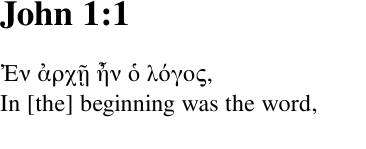
Then in your text, you can freely intermingle Greek and English, thus:
	Ἐν ἀρχῇ ἦν ὁ λόγος,\\
	In [the] beginning was the word,\\
Build using xelatex
xelatex mydoc.tex
and the result will be put into mydoc.pdf
      \documentclass[a4paper,12pt] {article}
      \usepackage{fontspec}
      \setromanfont{FreeSerif}
      \usepackage{geometry}
      \begin{document}
      \section*{John 1:1}
	Ἐν ἀρχῇ ἦν ὁ λόγος,\\
	In [the] beginning was the word,\\
      \end{document}
Run through xelatex, and the result is: